6 min read
Power failures, battery issues, and weird error codes can turn any off-grid setup into a headache. Whether your solar system isn’t charging, your generator keeps stalling, or the lights flicker every time you run the fridge, troubleshooting off-grid power gear is never as simple as the manuals make it sound. Most people searching for “need help trouble shooting” are stuck, frustrated, and looking for clear, step-by-step guidance—without advanced electrical jargon or risky DIY shortcuts. This guide walks you through practical troubleshooting strategies, common failure points, and how to choose gear that makes diagnosis and repair easier for non-experts. You’ll also find a side-by-side comparison of real-world products, so you can pick equipment that’s actually serviceable in the field, not just on paper. For more detail, see RV electrical system troubleshooting.
Comparison Table: Off-Grid Power Systems With Easy Troubleshooting Features
| System Type | Battery Capacity | Inverter Output | Diagnostics Display | User-Replaceable Parts | Pros | Cons |
|---|---|---|---|---|---|---|
| 1200Wh LiFePO4 Power Station with 1000W inverter | 1200Wh (LiFePO4, 2500+ cycles) | 1000W pure sine (2000W surge) | Full LCD: voltage, state of charge, error codes | Battery, fuses, cooling fan | Easy to swap fuses, clear error readout, long battery life | Heavy (11kg), fixed inverter size |
| 800Wh Portable Power Box, 600W inverter | 800Wh (Li-ion NMC, 500 cycles) | 600W pure sine (1200W surge) | Basic LED: battery % only | None (sealed unit) | Lightweight, simple to use, compact | No user serviceable parts, limited lifespan |
| DIY 200Ah AGM Battery Bank + 1500W inverter | 2400Wh (AGM, 500 cycles) | 1500W modified sine (3000W surge) | None (requires external monitor) | Batteries, inverter, cables | Fully customizable, parts easy to source | No built-in diagnostics, needs basic wiring knowledge |
| 1800Wh Solar Generator, 1500W inverter | 1800Wh (LiFePO4, 3500+ cycles) | 1500W pure sine (3000W surge) | Color touchscreen: input/output watts, battery %, error log | Battery, charge controller, fans | Detailed troubleshooting info, modular design | Expensive, touchscreen can be fragile |
If you’re scoping options for later,
Pinpointing Off-Grid Power Problems: What to Check First
Most off-grid troubleshooting boils down to a few major culprits: batteries, connections, charging sources (solar or generator), and inverters. Before you start replacing parts, run through these checks in order:
- Battery health: Is the voltage above 12.0V (for 12V systems) or 24.0V (for 24V)? Anything below 11.5V usually means the battery is deeply discharged or damaged.
- Connections: Inspect every cable for tight, corrosion-free terminals. A single loose or oxidized connection can drop voltage and cause “phantom” failures.
- Charging input: If using solar, check the panel voltage on a sunny day. For generators, confirm output with a plug-in meter—many “won’t start” calls are just tripped breakers or low oil levels.
- Inverter status: Most pure sine inverters display error lights or codes for over-temperature, overload, or low voltage. Reference the manual for any blinking patterns.
Write down any error codes or symptoms before you start swapping components. This info can save hours (and money) if you need to contact tech support.
Choosing Gear That’s Easier to Troubleshoot
The best way to avoid hours of head-scratching is to buy gear designed for troubleshooting in the first place. Here’s what to look for:
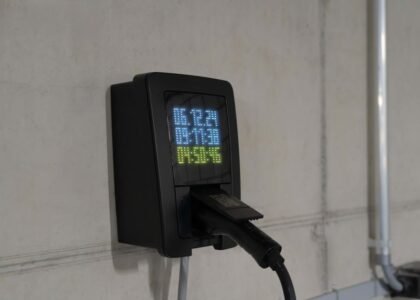
- Detailed status displays: Look for LCD or color screens that show battery voltage, input/output watts, and error codes—not just a “full/empty” LED. For example, a display that reads “13.2V, 0.0A input, E04” gives you a real starting point.
- User-replaceable parts: Systems with modular batteries, pop-out fuses, and accessible fans or controllers cut downtime. Example: A unit with a slide-out fuse tray (accepts standard 30A blade fuses) can be field-fixed in minutes.
- Accessible wiring terminals: On DIY battery banks, choose components with screw-down terminals and clear polarity markings. Avoid permanently sealed “plug-only” setups, unless you’re sure you’ll never need to service them.
- Clear documentation: Some power stations include QR codes linking to error code explanations and video guides—much better than cryptic paper manuals.
See today’s deals on power stations with advanced diagnostics and replaceable parts.
Common Mistakes That Lead to Troubleshooting Nightmares
Some problems crop up again and again, especially in off-grid or mobile setups. Avoid these traps to save yourself future headaches:
- Mixing old and new batteries: Even a single weak cell can drag down a whole bank. Always replace all batteries in a series string at the same time, and stick to the same chemistry (AGM, LiFePO4, etc).
- Undersized wiring: Thin cables can overheat or drop voltage, especially on inverters over 1000W. Use at least 4 AWG for 1000W, 2 AWG for 1500W+ at 12V.
- Ignoring error codes: That “E02” flash isn’t just a nuisance—it’s trying to tell you what’s wrong. Take a photo and look it up before guessing.
- Overloading inverters: Appliances with motors (fridges, pumps) can surge 2-3x their running wattage at startup. If your inverter cuts out, check the surge rating and actual load.
- Letting batteries sit discharged: Especially with lead-acid or AGM, leaving batteries below 12.0V for days will shorten lifespan and cause performance dropouts.
When to Replace vs. Repair: Making the Call in the Field
Sometimes, even the best troubleshooting can’t resurrect a dead battery or fried inverter. Here’s how to decide:
- Batteries: If voltage drops below 10.5V after a full charge, or you measure less than 70% of rated amp-hours, it’s time for replacement. For LiFePO4, a sudden drop in capacity after 2000+ cycles is normal wear.
- Inverters: Persistent error codes (like “overload” with nothing plugged in), burnt smells, or no output at all usually point to internal failure. If the unit is out of warranty and parts aren’t user-replaceable, replacement is safer and often cheaper.
- Solar charge controllers: If you see zero input with the panels in full sun, double-check voltage at the terminals. If input is present but the controller stays blank or flashes fault codes, replacement is likely.
for field-serviceable batteries and modular inverters.
FAQs: Real-World Troubleshooting for Off-Grid Beginners
Why does my battery bank seem to drain overnight, even with everything turned off?
Phantom loads (small devices on standby), inverter idle draw, or a wiring short can all drain batteries. Even a 1A idle draw will drain 24Ah in 24 hours—enough to flatten a 100Ah battery quickly. Unplug everything, then add loads back one at a time. Use a clamp meter to check for current with all loads supposedly off.
My portable power station shows “input error” when I plug in solar panels. What’s wrong?
Most power stations require a specific input voltage (commonly 12–30V DC). Panels wired in series may exceed this, or shaded panels may drop too low. Check your panel’s open-circuit voltage rating and compare to your unit’s spec. Always use the included adapter cables to avoid polarity issues.
How do I know if my inverter is big enough for my appliances?
Add up the running wattage of all devices you’ll use at once, then multiply the largest motor’s rating by 2.5 for surge. For example, a 1200W fridge may spike to 3000W at startup. Pick an inverter with at least 20% extra capacity over your calculated peak load.
What’s the safest way to test my battery’s health?
Use a digital voltmeter to measure voltage after the battery rests (no charge or load) for at least 1 hour. For 12V lead-acid, 12.7V is full, 12.0V is 50%. For LiFePO4, 13.3V is full, 12.8V is “empty.” For a more accurate test, measure amp-hour capacity with a battery monitor (requires installation).
My generator runs but my batteries aren’t charging—what should I check?
First, confirm the generator’s AC output is live using a plug-in meter. Then, check if your charger (or power station) is set to the correct input mode. Many units require manual switching between solar and AC input. Also, inspect all fuses or breakers between the generator and battery bank.
Is it safe to open my sealed power station or battery to replace parts myself?
No—sealed units are not designed to be user-serviced, and opening them can void warranties or cause safety hazards (especially with lithium batteries). Only attempt repairs on gear specifically designed for field servicing, with clear instructions and replaceable modules. For anything else, contact the manufacturer or a qualified technician.
Still stuck or want gear you can actually fix yourself? View what’s available for off-grid systems with real-world troubleshooting support and modular designs.
Related Guides
- Amp Hours vs Watt Hours: What’s the Real Difference?
- Portable Power Stations for Camping: Which Ones Are Worth It?
- Portable Generators vs Inverter Generators: What’s the Real Difference?
- Our guide to Understanding 12V Solar Charge Controller Circuit Diagrams: What Matters Most
- Our guide to Choosing the Best Solar Generator Kit for Home Backup Power
- The Best Battery Monitors, Reviewed for Reliable Off-Grid Power
- Browse all Portable Power Stations →
- Which of These Two Systems Should You Choose?